Showing posts with label vernier. Show all posts

Thursday, July 23, 2015

Vernier Go Wireless Link: Creating New Opportunities for Mobile Data Collection

It certainly is exciting times to be involved in the field of educational technology and if your are a science teacher there is even more opportunities with your existing classroom technology to take advantage of using science probeware in your classroom. If you have been following my blog, you know how passionate I am about teachers using probeware in the classroom to give students the capability of collecting data in real time. This is an especially important tool if you are supporting students with special needs-in that these tools provide students with a way to see data represented in many different types of ways. Students can view the incoming data in a graph format, table and as a meter. 

In July, Vernier Software released the Vernier Go Wireless Link which opens up all kinds of opportunities for students collecting real time data with mobile devices. The Vernier Go Wireless Link is a very small data collection interface that allows you to plug in over 35
different Vernier sensors and begin to collect data wirelessly to your iPhone, iPad and iPod Touch. Later this summer, Vernier will also support Android devices and the LabQuest 2. The diminutive size of the  Vernier Go Wireless Link  makes it an ideal tool for collecting data in the classroom as well as when you are in the field. The  Vernier Go Wireless Link  uses Bluetooth LE and once turned on it will automatically connect to you device without the need to do any configuration. Simply charge the  Vernier Go Wireless Link with the USB cable provided and then you are ready to begin collecting data. 

Using the  Vernier Go Wireless Linkto collect real time data is a breeze. Simply turn on the Go Wirelss Link, connect a compatible sensor,
Right Hand Strength
launch Graphical Analysis, tap create experiment, choose Wireless Sensor, choose Go Wireless Link and begin your data collection. I have to say that using the 
 Vernier Go Wireless Link was very straight forward and easy to use. I connected the  Vernier Go Wireless Link  to a Hand Dynamometer and clicked on the Connect button to start my data collection. Within seconds the data was being graphed on the screen as I squeezed the sensor with my right hand. 

Using the  Vernier Go Wireless Link  gives students the opportunity to collect data quickly and accurately and because of the size of the interface they can easily use it in the field away from the iPad. The  Vernier Go Wireless Link  has a range of 30 m which would enable teachers and students to keep the device away from water or other hazards when collecting the data. 

So if you have existing compatible Vernier sensors and are looking for a great way to connect them to your IOS or Android devices look no further, the  Vernier Go Wireless Link  is the perfect interface for getting your students collecting data with mobile devices! 


Saturday, April 11, 2015

Using Vernier Go Wireless Sensors in the Classroom

I have always enjoyed my science classes when I was in school, especially when we did hands on labs. Unfortunately, as I reflect on my education many years later, there just were not enough labs integrated into my science classrooms. In retrospect, with the equipment we had in the day, it just took too much time to set up and labs took an inordinate amount of time which were always thought to take away from the instruction at hand. Nothing could be further from the truth-but it was the best we could do at the time when I was in high school science classes in the early 1970s. Jump to 2015, and there is a vast array of technology that science teachers can use in their classrooms to help students to better understand key scientific concepts. 

Giving students the opportunity to experience firsthand how to collect data with science probes and sensors lets them quickly and efficiently collect real time data very much as a scientist would. While we often struggled to collect accurate data when I was in high school this factor is eliminated when using digital probes and sensors. Now students can spend their time analyzing and making sense of the data collected instead of expending all their energy in pursuit of recording the data. Using probes and sensors with the iPad has revolutionized the way students can collect data in real time and now with the advent of a family of probes with built-in wireless technologies from Vernier Software & Technology, students don’t need to be tethered to the device to collect data during an experiment. I recently started to use the Vernier Go Wireless Temp and the Vernier Go Wireless pH with my iPad Air and want to share my impressions.  

Plotting Temperature Data Using Vernier Go Wireless Temp Probe
The first thing you will need to do before using the Vernier Go Wireless Temp ($75) and the Vernier Go Wireless pH ($99) is download the Vernier Go Wireless app from the Apple App Store. To use the probe you simply hold down the power button to turn it on and then launch the Go Wireless app. Select the sensor that you are using, in this case we will start off with the Vernier Go Wireless Temp. Once you select the sensor you are ready to begin collecting your data. To switch between Centigrade and Fahrenheit simply tap on the oval with the current read out. To begin your data collection simply press on Collect which is at the top of the window. As soon as do this you will begin to see your data points graphed against time. For me, what is really exciting is how this technology allows students multiple representations of the data as it is being collected which is really important for the type of students I work with learning differences. It can provide a digital read out in a numeric format, and as visual bar chart and in a graphical format. Students can click anywhere on the graph and find out the temperature value at a specific time. If a student is using VoiceOver ton he iPad it will read aloud the data value on the screen. For students who would like to do further analysis they can always email the data set and open the file in Excel. 

Using the Vernier Go Wireless pH sensor it is just as easy, select the sensor from the Vernier Go Wireless app and place the probe in the liquid solution and press on the Keep button which will then allow you to record the pH for the sample. When you press the Keep button a small dialog box opens up that lets you enter a description and your observation along with the pH reading. Students have the opportunity to enter a note in the Observation field which would be a good place to record their observations. If you like students could also record their observations using the built-in speech recognition feature found in the iPad. Again, students are given a clean and simple interface to record the pH of the solutions that they are working with. The pH readout is clearly delineated on the top left of the screen along with a bar that runs along the left side of the screen that clearly marks the pH
ph Data
Recording pH with Vernier Go Wireless pH Probe
range which goes from 0 to 14. A demarcation line makes it easy for students to clearly see the pH of the solution. Students can export the data table to Excel for further analysis. As you can see in the screenshot, I recorded the pH of tap water, vinegar, shower cleaner, and bottled water with my observations. Recording the pH of the solutions was very quick and straight forward. For advanced data analysis and graphing capabilities with the Go Wireless sensors on the iPad you can download the Vernier Graphical Analysis. Using the Vernier Graphical Analysis students can annotate their graphs and obtain statistical data on their data set.

From my perspective, Vernier has spent a lot of time making the experience of using the wireless sensors as full proof as possible so students can spend their energy collecting and analyzing the data. Setting up the Vernier Go Wireless sensors were a breeze and were immediately recognized on my iPad, without the need for me to manually pair them in any way. This point is important because it is these little details that can bring a lab down when you are using technology in the classroom. If you are not using sensors in your classroom you need to take a look at the Vernier Go Wireless sensors to get you started. Having access to tools like the Vernier Go Wireless sensors will empower your students and let them have hands-on experience collecting data as a scientist would do. So jump in and see how you can provide your students with experiences that can transform their understanding of scientific concepts with Vernier Go Wireless sensors for more information go to Vernier.com 

Sunday, September 7, 2014

Science Under the Lens: ProScope Micro Mobile from Vernier

Getting students engaged in the learning process is paramount these days and what better way to do this than with computer technology. As our American education is going through a transformation there is an understanding that the students in our classrooms today need to become well versed in science, technology, engineering, and mathematics. Looking at the Next Generation Science Standards it is clear that this document is a real paradigm shift in how we deliver instruction in the classroom in these areas. It is clear that the shift
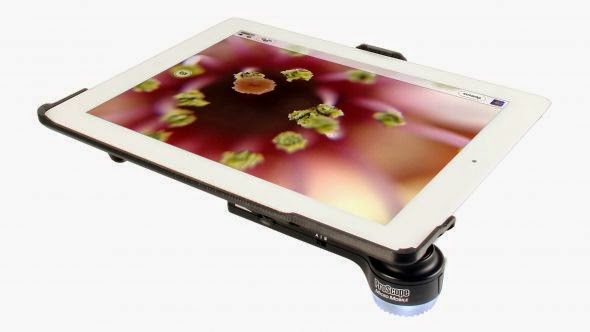
ProScope Micro Mobile
is a move away from rote memory to a performance based model of students demonstrating their knowledge by doing and showing their conceptual understanding of the material. It is in this context that Vernier Software and Technology has been providing educators and students with sensors and probes to provide students with the opportunity to perform scientific inquiry. It is clear from the research, that giving students hands-on experience with the tools that scientists use is one way for students to develop a deeper understanding of scientific processes and concepts.


With many schools adapting the iPad for instruction it is exciting to see how many companies have begun developing accessories that can transpose the device into a tool that students can use for scientific inquiry. It is in this light that Vernier Software and Technology just released the ProScope Micro Mobile which turns the IOS devices and Samsung Galaxy S4 into a digital microscope with 20x-80x magnification utilizing an Edmund high quality glass optic lens. The ProScope Micro Mobile has a built-in lithium battery which keeps its charge for up to 5 hours and has a fast 2 hour charging cycle via a USB cable.

The out of box experience was very positive and the Quick Start Guide got me up and running quickly, once I had fully charged the ProScope Micro Mobile.  When you purchase the ProScope Micro Mobile you will need to decide which device you will be using it so that you get buy the proper housing for the lens. The lens can be used with many devices as long as you buy the appropriate housing for your device. Having said this, I fit the lens assembly into the housing and snapped it onto my iPad Air. The lens fits over the camera on the iPad and has a ring of LED's which can be adjusted for the best lighting effect and to reduce surface reflection. At this point you can open your Camera app on your iPad, turn on your ProScope Micro Mobile, adjust the LED's, and adjust the magnification to see what is under your microscope. I placed a strand of my hair under the ProScope Micro Mobile and was amazed at what I was able to see. To capture the strand 
Captured with IPEVO Whiteboard aa on iPad Air
of hair under the 
ProScope Micro Mobile you simply click on the Camera button to capture the image. The ProScope Micro Mobile allows you to use whichever camera app you elect, which gives you a wide range of options. 

Teachers in the classroom may want to consider using the IPEVO WhiteBoard or the Belkin Stage app with the ProScope Micro Mobile to give students more options for capturing and annotating what they capture under the microscope. Using the included built-in hands free stand, teachers have the capability of capturing and saving video as well that is under the microscope that they can share with students. For
Leaf Under Microsocope
$149 dollars the 
ProScope Micro Mobile is a high quality iPad accessory that can bring science to life for students in the classroom. I for one know that students will get really excited about using this tool in the classroom or in the field to bring science to life. If you are looking for ways to bring excitement back into science and engaging your students in the process then look no further and consider requisitioning the ProScope Micro Mobile.

Wednesday, July 18, 2012

LabQuest 2 from Vernier- Connected Science System

It has been a couple of years since I last reviewed the Labquest from Vernier, so when I was able to get my hands on the LabQuest 2, I was really excited to find out about all the new enhancements in this new handheld connected science system. The LabQuest 2 is about the size of large cell phone with a high contrast screen that is powered by a high capacity rechargeable Lithium battery. The Labquest 2 has a great design and feels very solid in your hands as you use the device. The high resolution touch screen is great for viewing when you are using it outside in the field. Vernier did not skimp on the processing power in this device and you will find it very responsive when you are collecting or analyzing data on the device. The LabQuest 2 supports all of the Vernier sensors making it easy for schools who have invested in their devices and probes. The LabQuest 2 now includes both WiFi and Bluetooth which opens up all kinds of possibilities which I will discuss later in the post. Additionally, the LabQuest 2 has built-in accelerometers as well as GPS which can be utilized with other sensors for recording such data. I should mention that the LabQuest 2 is compatible with both Mac and Windows computers.


LabQuest 2 Screenshot
But no matter how good the hardware is-how does the LabQuest 2 hold up when in use? This is where this device really shines! Teachers will find that the LabQuest 2 is a dream to use-just plug in the sensor which will be automatically detected by the LabQuest 2 and press the Collect button to get started. Instantly students will be able to see their data being displayed on the screen. Once the data is collected students can spend their time using the analytic tools built in or transfer the data to a computer. Teachers can also have students email the data, graph, or screenshot directly from the LabQuest 2, that was captured, which makes it easy to include in a lab report. The LabQuest 2 supports analysis with linear and curve fits and allows students to record their notes on the device, with the on-screen keyboard. Teachers will enjoy the fact- knowing that the LabQuest 2 comes with over 100 experiments that are pre-loaded on the device which students can access. If teachers would like to customize the labs, Vernier has a handy Lab Creator Tool that is available to teachers that allows you to tweak the lab to your liking. 


Vernier Data Share on iPhone 4S
In this age of bring your own device (BYOD) Vernier has taken this model to heart and created the "connected science system," allowing anyone with a browser to view and interact with the collected data. This enables students with iPhones, Android Phones, iPod Touches, and iPads, to launch their browser and view the data live as it is being collected. All the students need to to do is go to their Settings and make sure that their device and the LabQuest 2 is on the same wireless network. Now simply launch the browser and enter in the IP address or name of Network and voila you are ready to view the data being collected in real time. I have tested various browsers, using my iPhone, iPad, and Kindle Fire with the LabQuest 2 and in each case the data was instantaneously available for me to preview in real time. For a richer set of tools, teachers can purchase the Graphical Analysis for iPad app from the App Store.

With the LabQuest 2, Vernier has transformed the way teachers need to think about teaching science in the classroom and provided them with an easy and powerful solution for capturing data in real time. Utilizing their "connected science system" with the LabQuest 2 it is now possible to extend their set of tools to students, so that they can collaborate in real time-by simply launching a browser. For teachers that want to create more interactive science lessons and give students the opportunity to collect data the LabQuest 2 is certainly an outstanding tool you should include in your classroom. Giving students the opportunity to both visualize and analyze data is at the heart of science and what better way to make it hands-on than with the LabQuest 2. For ore information about the LabQuest 2 you can click here.

If you are considering using the LabQuest 2 in your classroom Vernier will be offering free 4 hour workshop sessions in the Fall. For more information about the workshops click here.