Showing posts with label Review of Ipevo Whiteboard app. Show all posts

Monday, June 10, 2013

Doing Somersaults with The MAX HandStand DX

As I had noted in a previous post one of the technology trends that you be seeing in the upcoming school year will the be the use of the iPad as a document camera and as presentation tool! The iPad will give
MAX HandStand DX
teachers the flexibility to teach and do demonstrations like no other tool they have ever used. It is truly exciting times for educational technology and for teachers to harness the power of these tools. I for one no longer take my laptop with me when I do presentations, but instead reach for my iPad and Apple TV. By connecting my Apple TV to my Epson PowerLite 915W projector with HDMI, I can take advantage of Apple's Airplay Technology and project images and apps from my iPad to the screen. 

What a great experience it is to be able to utilize my iPad as a presentation and teaching tool. But now watch what happens when I pair up my iPad and Apple TV with the MAX HandStand DX, The MAX HandStand DX is a solidly built stand for the iPad that can be affixed to the tabletop with a clamp to give me even more options when I present. Imagine a rugged stand that has the flexibility of being positioned just about any way you want so that you can use it as a presentation stand or better yet as a way to project and annotate what you see under the iPad's camera. The MAX HandStand DX can securely fit your iPad with its spring loaded frame and comes with a security lock so that once affixed it can not be taken out of the frame without the key. The MAX HandStand DX can be permanently affixed to the table top if you so desire-but having the flexibility to place the MAX HandStand DX where you want in the classroom makes it ideal. With a 360 degree swiveling and articulating arm the MAX HandStand DX allows you to position that iPad in innumerable ways. Once the iPad is secured in the MAX HandStand DX you can lock it and then use it in the landscape or portrait mode.The fun really begins when you use the MAX HandStand DX and your iPad as a way for students to see what is under the iPad's camera. Using a number of free annotation apps like IPEVO Whiteboard, Skitch, or Board Cam teachers can use these apps to annotate anything that is under the iPad's camera and project it to students. While it helps if you have an Apple TV so that you can take advantage of Apple's AirPlay technology the same thing can be accomplished using an Apple 30 pin to VGA or Apple's Lightning to VGA dongle that is directly connected to your data projector. Giving teachers the the opportunity to make their lessons more visual amplifies the learning and gives students the chance to learn new concepts and ideas in new ways. To get an idea of how to use the MaxCases HandStand DX watch Jon Corippo an Apple Distinguished Educator use  the iPad and Apple TV and the stand in the classroom.

Using the MAX HandStand DX with your iPad opens up teaching and learning opportunities that were just not possible. So give the MAX HandStand DX a try and let me know what you think. In addition to making great products, the folks at Maxcases are wonderful to work with and strive to help teachers make the most of their iPad investment. So if you are not familiar with MAXCases- just click here and find out about all of their great technology products for the classroom.

Wednesday, April 24, 2013

Tools of the Trade- A Day of iPad Training

MaxCases Educator
Today I set off to do an iPad Training and thought it would be interesting for you to find out what I packed for the workshop. Of course, I packed my trusty Apple iPad which I have been using for the last 2 years and it has treated me well. I also used my Epson Powerlite 915W projector which not only supports VGA but HDMI which is great for using with the Apple TV. If you really want to experience the iPad when doing training then you need to carry your Apple TV with you, so that you can move around the room with the iPad as you are projecting the screen. Apple's Airplay technology is just great for sending the video and audio to the device. I also used the Maxcases Educator Case with my iPad which allowed me to hold the iPad securely with the adjustable hand strap which gave me the freedom to write directly on the iPad using the free IPEVO Whiteboard app. Using the IPEVO Whiteboard app enabled me to use the iPad as if I were using an interactive whiteboard and could simply write on the screen on the iPad and everyone was able to see the contents. I also demonstrated the IPEVO Ziggi-HD document camera and IPEVO Wireless Station for iPad which gives you the power of utilizing a document camera with the iPad. For my presentation, I used a Haiku Deck that I customized for this training session which looked spectacular- the graphics really popped.and having a 3000 Lumen, Epson 915W projector really sets the stage for some fantastic looking images on the screen. I also used the Belkin Tablet Stand which worked great to position my iPad on the desk when I wasn't using the Maxcases Educator case. It's really a symphony when all the pieces come together! A super day of training was had by all :-)

Created with Haiku Deck, the free presentation app for iPad

Thursday, April 11, 2013

Great Day Presenting to Undergraduate Students Majoring in Education

It was really great being able to share the work that I am doing with undergraduate students who are majoring in Education at the College of St. Elizabeth. Today was their annual educational association conference and I had a chance to share the work I am doing using iPads in the classroom. I had a chance to demonstrate a number of new and innovative technologies that in some way all connect to the iPad. The students got a real kick out of the demonstration I did with the iPevo Wireless Station and the iPevo Ziggi HD document camera. I placed three quarters under IPevo Ziggi HD camera and then handed three groups of students an iPad with the iPevo Whiteboard app installed  Once the students logged into the iPevo Wireless network they were all able to see the three quarters and annotate on top of the image. I shared with the group how this strategy and approach could be used as students set off to solve real world problems having access to high quality video feeds. In my presentation, I next demonstrated the Mighty Scope Connect, a handheld wireless digital microscope from Aven, Inc. The Mighty Scope Connect, is an impressive microscope that easily creates an adhoc wireless network with your iPad and utilizing their Wi-Viewer app it wirelessly sends the image to the iPad. The quality of the image under the microscope was really crisp and clear and the future teachers could think of some interesting ways to utilize this tool in the classroom. Just like the iPevo solution, students could log into the Mighty Scope Connect network and view the image in stunning detail on their iPads using the supplied app.  I plan on doing a more in-depth review of theMighty Scope Connect in another blog post. As part of my presentation I also demonstrated probeware from Pasco and how it could be utilized with the iPad using a Bluetooth connection. Using the PasPort Airlink 2 connected to a Temperature, Sound Level, & Light probe, I was able to demonstrate how the device could capture the light level in the room in real time and display it on the iPad. It was enjoyable day and the students were very excited to learn about all of the innovative technologies that are out there and find their way to the classroom.

Created with Haiku Deck, the free presentation app for iPad

Monday, March 4, 2013

New Trend Emerging in Classroom Presentation Systems

As the iPad begins to transform the face of education- we will shortly begin to see it take hold of another facet of learning in the classroom - notably the interactive whiteboard. I can remember like it was just yesterday the excitement of working on a SMART Board for the very first time. It transformed the classroom and gave both teachers a portal to the internet that they could share with their students with such ease. While interactive whiteboards of all varieties are much more common in today's classrooms across America they never really changed the dynamic of the classroom with the teacher standing in the front of the classroom directing the lesson. Yes- I know that students do come up to the interactive whiteboard on occasion to interact with the board but for the majority of students, they sit idly at their desks waiting for a turn. This is all about to change as the iPad infiltrates this next arena of the classroom notably the interactive whiteboard.

About two weeks ago I had a briefing with Jon Roepke, Belkin Senior Product Manager, Education who had a chance to share with me some of the new offerings from Belkin in the K-12 marketplace. I was excited to learn about the Belkin Tablet Stage and the accompanying Belkin Stage App that would be released in March 2013. The Belkin Tablet Stage transforms the iPad into a document and presentation system which looks to rival some of the standalone systems that are currently be used in the classroom. The Belkin Tablet Stage is compatible with tablets that are 7" to 11" and has an adjustable platform with cable management allowing you to adjust the iPad as you see fit. The Belkin Tablet Stage contains adjustable LED lights and has a document camera mode to captures images and live video. The accompanying  Belkin Stage App which is free, compliments the system and lets teachers annotate on top of the live video feed. With the latest edition of the Belkin Stage App, teachers can pay $1.99 which allows them to record and save live video feeds to their Camera Roll. Teachers will find using the Belkin Stage App easy and intuitive to use, providing teachers with a good set of annotation tools. Teachers can draw on top of any image or video feed using various colored markers or use the Label Tool to bring text flags into the stage. If you opt to buy the video record feature you can record your annotations and audio and save it to the camera Roll and share it out which is a great feature. Utilizing the Belkin Stage app will enable teachers to move around the classroom and use the iPad as if it were a graphics tablet. Anything written on the app will be immediately projected to the screen. Students could easily take hold of the iPad and share their ideas and thoughts or small groups of students could be working together and sharing their group work. Giving teachers the flexibility to move about the classroom with the iPad projecting the image will be the next wave and utilizing Apple's Airplay technology is pretty straightforward. Many classroom are installing Apple TV's to accomplish this while other may choose a software solution like the Reflector App which routes the video and audio through a Mac or PC that is on the same wireless network.

I am really excited by this product because it will enable teachers and students to scan and capture high quality worksheets and text book pages which can then be utilized by other programs. Working with lots of students with fine motor disabilities it is possible to scan their documents and annotate on top of them- but one of the weak links is getting a good quality scan which is sometimes hard when you have to hold the iPad still for a period of time. Having access to the Belkin Tablet Stage will enable students to capture high quality images which can then be annotated on using a variety of scanning apps. Similarly we will begin to see higher quality Optical Character Recognition (OCR) apps which will enable students to scan the text directly into their iPad and have it read aloud. Pretty amazing developments!

IPEVO Whiteboard Screenshot with Annotation
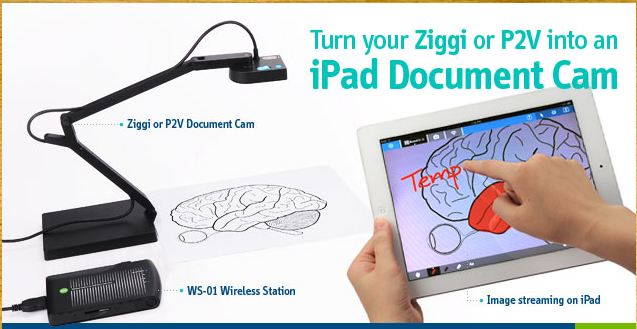
In the same vein, I had a chance to sit down with Alex from IPEVO to get an update on some of their new product offerings for the classroom which should be imminent. It was exciting to hear about all of the new releases which as you can imagine, revolved around the iPad. Alex brought with him the Wireless Station for iPad and USB Document Cam and demonstrated how using their Point 2 View (P2V)  Document camera that one could wirelessly send a live video feed from under the camera to the iPad in real time. The set up was very easy as the Wireless Station for iPad sets up an ad-hoc wireless network that communicates to the iPad. One has to simply plug in the P2V Camera into the Wireless Station and then in the iPad's Network Settings select the Wireless Station WIFI network. Once you open the IPEVO Whiteboard app you can click on the Wireless Device icon to select the device and you are ready to use the camera. If you want to use the Internet while connected to the Wireless Station you can route the Internet via WIFI connecting through the Wireless Station making it easy to use both the camera and Internet at the same time. Utilizing their recently released free IPEVO Whiteboard app it was possible to annotate directly on the video using any of a number of different markup tools which includ: free from markers, arrows, boxes, circles, text, lines and arrows. The software was easy to use and a teacher could capture what was on the iPad screen to the Camera Roll or send it to Evernote for later use. The IPEVO Whiteboard app gives teachers the freedom to bring in pictures from their Camera Roll or create a new board using a Plain White background for writing on. While teachers can certainly use their fingers to write with it, is easier when using this app to use a stylus. IPEVO's telescoping Stylus fits the bill and give you the option to elongate it if you  need to do so when using the iPad. Teachers can use the Point 2 View or Ziggi USB camera with the Wireless Station and the soon to be released Ziggi-HD camera. Teachers can create sessions with multiple boards while using the IPEVO Whiteboard app and switch between them quickly.

It is clear to me that the we are beginning to see a new trend in using the iPad as an interactive presentation system in the classroom which will begin to take hold for the start of the next school year. The interplay of  Apple's Airplay technology coupled with these low cost solutions will define a new market for interactive technologies in the classroom; benefiting both teachers and students in the learning process.