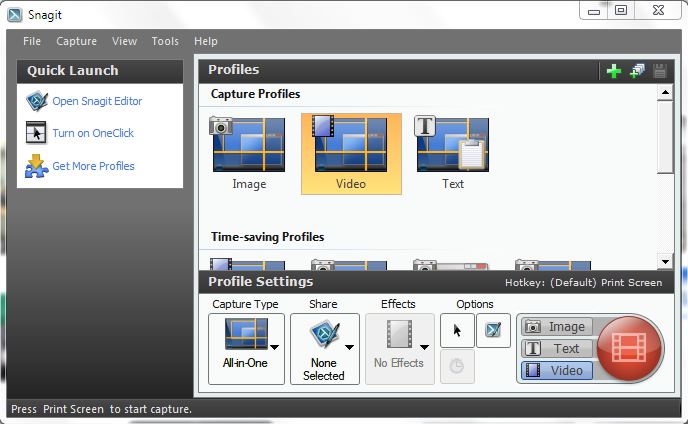
I have been a long time fan and user of Snagit from TechSmith, Inc for many years now and I am always amazed at the features. One of the newer features is the ability to capture video from your screen which has really come in handy lately as I am developing some eLearning modules. While many of us will initially think of using Snagit to capture screen images the latest version of Snagit can capture video along with audio and System audio making it indispensable tool for instructors and eLearning developers who are looking for a quick and easy way to capture video off of the screen. I recently created a short video using GoAnimate and wanted to save it in MP4 format to insert into an Adobe Presenter 8 module I was creating. Using Snagit's new ability to capture the GoAnimate video was a piece of cake and the quality of the video capture was outstanding. So take a look at Snagit and see how you might use it- it is one of the best kept secret and is available for Mac and Windows. Here is the example of what was captured using Snagit
Showing posts with label TechSmith. Show all posts
Saturday, October 13, 2012
Monday, August 27, 2012
Boogie Board RIP Adds Handwriting Recognition
by: Unknown No comments
categories: Boogie Board, boogie board rip, Camtasia Studio 8, Evernote, MyScript Studio Notes Edition, TechSmith
In my last post I share with you how the Boogie Board RIP integrates with Evernote the online note taking service. Today I would like to share with you a screencast that shows you how you can take your hand written notes and covert them to editable text that can be exported to Microsoft Word. The Boogie Board RIP now supports hand writing recognition using MyScript Studio Notes Edition software which adds another facet to this handy note taking device. Watch my screencast as I demo just how easy it is to convert your notes with MyScript Studio Notes Edition. Download a rial version of . Download a trial version of
MyScript Studio Notes Edition and see just how easy it is to convert your handwritten notes!
This screencast was created using Camtasia Studio 8
MyScript Studio Notes Edition and see just how easy it is to convert your handwritten notes!
This screencast was created using Camtasia Studio 8
Saturday, June 30, 2012
Have You Flipped? Your Classroom That Is
There was a lot of buzz at ISTE 2012 with regards to the "flipped classroom" and how it can be implemented in the classroom. Many educators who were talking about the change in how instruction is being delivered were excited by what they see happening in their classrooms. For those of you who may not be familiar with the term "flipped classroom" -it is when the instruction takes place outside the classroom thereby giving teachers ample time to differentiate instruction and have students apply their skills during classroom time. Many teachers who have moved to the "flipped classroom" model are creating short instructional videos in a number of creative ways using a host of different hardware and software solutions.
While at ISTE 2012, I had the opportunity to meet with Shane Lovellette, Product Manager for Camtasia Studio 8 who walked me through some of the new features that is found in their recent release of Camtasia Studio 8. Camtasia Studio is one of the leading screencasting applications in the marketplace and provides teachers with a rich set of tools to create instructional videos that can be played back on all platforms. Camtasia Studio 8 was rewritten from the ground up to take advantage of multiple platform play back and now with the new Quizzing feature it is a great way for teachers to assess students as they are watching the videos. All of the results of the quizzes are automatically linked to your Screencast account ensuring that responses are accurately reported and available to you in a user friendly format. Having access to Camtasia Studio 8 and a Wacom tablet will give you the tools you need to create instructional videos that your students will be engaged and able to learn from. Techsmith has created a great resources for educators looking to learn more about the flipped classroom.
There are certainly lots of way for teachers to create videos for the flipped classroom and another one of my favorite ways to do this is with the Livescribe Smartpen. Using the Livescribe Echo Smartpen teachers can simply record their instructional videos by writing in a Livescribe notebook as they are talking through the steps of the problem or lesson. The Livescribe Smartpen will automatically synchronize the audio and ink and allow students to watch the video as if they were sitting next to their teacher. The process of creating the pencast is straight forward and easily accomplished. Pencasts can be viewed on multiple platforms and be shared to iOS devices to be played back. The Livescribe Smartpens are certainly a great way to create content for the flipped classroom. For more information about how to get started with Pencasts please take a look at a post I did last year. Pencasts are also easy to embed into websites, wikis, and learning management systems (LMS) giving student access to the material whatever platform they are on.
While at ISTE 2012 I had a chance to stop by Improv Electronics, the developers of the Boogie Board and Boogie Board RIP. I have always found the Boogie Boards to be a very enticing and engaging tool for writing, drawing and doodling. Using the Boogie Board RIP and the Companion Desktop software along with Camtasia Studio, Jing or Screenr, teachers could create on the fly videos for their flipped classroom in no time. Here is an example of how to create a video using the Boogie Board RIP and the Companion desktop software. At the show, Improv Electronics announced that they would soon release new companion software the would allow your stored files on the Boogie Board RIP to be saved to your Evernote account. This is a huge feature and one that will certainly have educators looking at the Boogie Board RIP more closely once it is released. Evernote has become an integral piece of the educational marketplace with more and more schools and students using it to save notes, images and audio. The integration of the Boogie Board RIP and Evernote will certainly make this an enticing offer and one that I'm sure teachers will look at as a way to move notes to a digital platform in an inexpensive and convenient package. Improv Electronics also announced the availability of the MyScript plug-in this fall that will allow for hand writing recognition of notes recorded on the Boogie Board RIP.
For teachers who have an iPhone or iPod Touch (4th generation) you may want to take a look at the Swivl a truly innovative way to record video without the need for a camera person. the Swivl is a small motorized turret that can follow you as you move around the classroom simply by holding the marker that ships with the product. The Swivl gives you the freedom to create videos on the fly that can be started and stopped from the marker Additionally, the marker serves as a high quality digital recorder that guarantees no matter where you are in relationship to your iPhone or iPod you will deliver high quality audio to the device. Using the Swivl is really a breeze to learn. For more about the Swivl you can read a review that I recently posted. The Swivl is an easy and effortless way to capture high quality video in the classroom and gives you the freedom to move around. Using the Swivl would be another great way to create content for the flipped classroom.
ISTE 2012 was filled with great tools to allow teachers to quickly create content for their flipped classroom. Depending on your level of expertise there are entry and advanced tools for you to access to let you begin to experiment with the flipped classroom methodology. To learn more the flipped classroom you may want to take a look at this book which was recently published: Flip Your Classroom: Reach Every Student in Your Classroom Everyday. If you have any questions about how to create material using these tools for your flipped classroom please feel free to contact me via email. If you are looking for a workshop on content creation for the flipped classroom, please feel free to contact me. I am available for workshops and teacher training on these tools.
While at ISTE 2012, I had the opportunity to meet with Shane Lovellette, Product Manager for Camtasia Studio 8 who walked me through some of the new features that is found in their recent release of Camtasia Studio 8. Camtasia Studio is one of the leading screencasting applications in the marketplace and provides teachers with a rich set of tools to create instructional videos that can be played back on all platforms. Camtasia Studio 8 was rewritten from the ground up to take advantage of multiple platform play back and now with the new Quizzing feature it is a great way for teachers to assess students as they are watching the videos. All of the results of the quizzes are automatically linked to your Screencast account ensuring that responses are accurately reported and available to you in a user friendly format. Having access to Camtasia Studio 8 and a Wacom tablet will give you the tools you need to create instructional videos that your students will be engaged and able to learn from. Techsmith has created a great resources for educators looking to learn more about the flipped classroom.
There are certainly lots of way for teachers to create videos for the flipped classroom and another one of my favorite ways to do this is with the Livescribe Smartpen. Using the Livescribe Echo Smartpen teachers can simply record their instructional videos by writing in a Livescribe notebook as they are talking through the steps of the problem or lesson. The Livescribe Smartpen will automatically synchronize the audio and ink and allow students to watch the video as if they were sitting next to their teacher. The process of creating the pencast is straight forward and easily accomplished. Pencasts can be viewed on multiple platforms and be shared to iOS devices to be played back. The Livescribe Smartpens are certainly a great way to create content for the flipped classroom. For more information about how to get started with Pencasts please take a look at a post I did last year. Pencasts are also easy to embed into websites, wikis, and learning management systems (LMS) giving student access to the material whatever platform they are on.
While at ISTE 2012 I had a chance to stop by Improv Electronics, the developers of the Boogie Board and Boogie Board RIP. I have always found the Boogie Boards to be a very enticing and engaging tool for writing, drawing and doodling. Using the Boogie Board RIP and the Companion Desktop software along with Camtasia Studio, Jing or Screenr, teachers could create on the fly videos for their flipped classroom in no time. Here is an example of how to create a video using the Boogie Board RIP and the Companion desktop software. At the show, Improv Electronics announced that they would soon release new companion software the would allow your stored files on the Boogie Board RIP to be saved to your Evernote account. This is a huge feature and one that will certainly have educators looking at the Boogie Board RIP more closely once it is released. Evernote has become an integral piece of the educational marketplace with more and more schools and students using it to save notes, images and audio. The integration of the Boogie Board RIP and Evernote will certainly make this an enticing offer and one that I'm sure teachers will look at as a way to move notes to a digital platform in an inexpensive and convenient package. Improv Electronics also announced the availability of the MyScript plug-in this fall that will allow for hand writing recognition of notes recorded on the Boogie Board RIP.
For teachers who have an iPhone or iPod Touch (4th generation) you may want to take a look at the Swivl a truly innovative way to record video without the need for a camera person. the Swivl is a small motorized turret that can follow you as you move around the classroom simply by holding the marker that ships with the product. The Swivl gives you the freedom to create videos on the fly that can be started and stopped from the marker Additionally, the marker serves as a high quality digital recorder that guarantees no matter where you are in relationship to your iPhone or iPod you will deliver high quality audio to the device. Using the Swivl is really a breeze to learn. For more about the Swivl you can read a review that I recently posted. The Swivl is an easy and effortless way to capture high quality video in the classroom and gives you the freedom to move around. Using the Swivl would be another great way to create content for the flipped classroom.
ISTE 2012 was filled with great tools to allow teachers to quickly create content for their flipped classroom. Depending on your level of expertise there are entry and advanced tools for you to access to let you begin to experiment with the flipped classroom methodology. To learn more the flipped classroom you may want to take a look at this book which was recently published: Flip Your Classroom: Reach Every Student in Your Classroom Everyday. If you have any questions about how to create material using these tools for your flipped classroom please feel free to contact me via email. If you are looking for a workshop on content creation for the flipped classroom, please feel free to contact me. I am available for workshops and teacher training on these tools.
Sunday, August 24, 2008
Where did the Summer Go?
by: Unknown No comments
categories: Adobe Captivate, adobe ConnectNow, asus, Buzzword, camtasia_studio, crossloop, dell, dimdim, Flat Classroom project, HP, Jing, Jott, OoVoo, Skype, TechSmith, Yuuguu
As I write this post, I am reflecting on the past several days as my wife and I got my daughter situated and moved into her college dorm. If you have never moved a child into a a dorm or an apartment it sure is a lot of work! Once again another transition, as all of us move into our respective lines of work. Tomorrow I am back at the College of St. Elizabeth to start the Fall 2008 semester. It is hard to believe just how fast the summer went! I am eagerly awaiting to see my graduate students and look forward to sharing with them the trends and the new and exciting products that will soon be released. There is no escaping the impact that Web 2.0 has had on the field of educational and assistive technology as more and more mainstream tools on the web find their way into the work that we do. With free text to speech applications and the range of applications like Google Docs, Buzzword, Jing, and Jott- just to name a few, the combinations are endless as we craft our recommendations for the students we work with. As more and more teachers become aware of the power of wiki's- they can really begin to help students make their curriculum more accessible for those students that need it. All this summer I have been working with teachers on a math grant applying the principles of Universal Design for Learning into their math lesson plans. It has been exciting for me to watch how the teachers have embraced the UDL theory and have been able to plan accessible lessons which have been scaffolded with technology.Reflecting on my trip to NECC 2008- this year will go down as the year of the netbook. If you haven't had a chance to look at these ultra small notebooks now is the time to do so. The netbooks will be seen as just one more vehicle for students to have a rather inexpensive tool to access the internet with. Weighing in at about 2.2 pounds these devices will will run Window XP and in many cases a variant of Linux. Asus, Acer, and HP have jumped into the bandwagon and soon Dell will announce their new netbook which will probably be released later this month. Schools will begin to look at these devices more seriously because of the cost and their functionality for the money. Many of the netbooks start at around $300 dollars and up. It should be interesting to watch as schools begin to adopt these tools.
Teaching at the college gives me another perspective from the vantage point of higher education as to how technology is being applied for instruction. At the college all students have access to Blackboard which is used as a portal for instruction. I have created some very rich courses using Blackboard that provide my students with a multitude of resources. Over the years I have developed many learning resources for my students using Camtasia Studio, a wonderful application for creating screencasts and video tutorials. At NECC 2008, I was introduced to Adobe Captivate 3 which I will add to my einstruction toolkit. Adobe Captivate 3 not only allows you to create video demonstrations, but also allows you to quickly develop compelling interactive media which you can output to Flash. I will be posting some more information about Adobe Captivate 3 in some later posts in September.
Certainly, collaboration is the buzzword and I'm sure going forward you will be hearing more and more about this as developers add these features into their existing applications. But you only have to look to Web 2.0 technologies to see that the foundation is already there for example in Google Docs and Buzzword, just to name a few. For this reason it will become even more important when we are educating our students and preparing them for the world or work that they have opportunities to work in teams and to collaborate with others outside the context of their school. Do what you can to seek out the exciting projects like the Flat Classroom Project that are taking place on the web to give your students these invaluable opportunities and experiences. I have learned that, yes the world is flat and having tools like Skype, Oovoo, CrossLoop, Yuuguu, Adobe ConnectNow and Dimdim, have allowed me to conduct the work that I do effortlessly without the need to leave my office. So reach out beyond your school and district and challenge your students to use these rich sets of tools to make learning more meaningful and rewarding.
I trust that this will be an exciting start to the school year and I look forward to sharing my ideas and experiences with you as I continue to explore and use new tools. Please feel free to email me with your comments and suggestions.
Friday, July 25, 2008
SnagIt 9 and MindManager 7
Sometime ago, I did a screencast showing you how I use SnagIt with MindManager to add images to your mind maps. Since TechSmith recently released SnagIt 9 along with the MindManager Plug-in, I thought that it would be a good idea to show you just how you can effortlessly add images to your mind maps. In this screencast you can see just how easy it is to capture images and send them directly to MindManager 7. You can click on this link or on the image to see the screencast. EnjoyThursday, July 24, 2008
Jing Turns One!
Happy Birthday to Jing Project which celebrated its first year in production. I have used Jing in my courses and continue to use it for quick video tutorials. Techsmith in honor of its first year birthday has double the amount of storage and bandwidth on Screencast. So now you automatically get 2 GB of storage space to store all of your Jing screencasts. What a great deal! It looks as if there will be some premium services built around Jing in the coming months based on the email that I received. So go enjoy your new found freedom to create more Jing projects!Tuesday, January 22, 2008
MindManager Tip: Using the Paint Formatting Tool

I read today's Mindjet MindManager's blog post about using the Paint Formatting Tool and decided to create a screencast using Camtasia Studio 5.1 to show you how it is done. This tip was shared by Roger Parker noted author and mind mapping expert-who has done a great deal of work with MindManager in the course of writing and consulting. Click on this link to view the screencast.
Subscribe to:
Posts (Atom)


